QPAY Gateway
QPAY is a domestic payment network in Qatar, acting as a payment gateway for online transactions, particularly for Qatari debit card users. It allows businesses to accept payments from customers in Qatar using their debit cards through a secure and convenient online payment process.
For more information, refer to QPAY.
Prerequisites
To offer the QPAY payment method through the ANZ eGate payment gateway:
- Establish a merchant account with one of the member banks that participate in the QPAY payment gateway and obtain QPAY MID and credentials, which is required to register your domain and CNAME.
- Register with your ANZ eGate payment gateway service provider and share your QPAY MID and credentials, Domain, and CNAME.
- Ask your acquirer to configure your merchnat profile on the ANZ eGate payment gateway to enable QPAY gateway acceptance.
QPAY payer journey flow
The following stages describe the QPAY payer journey:

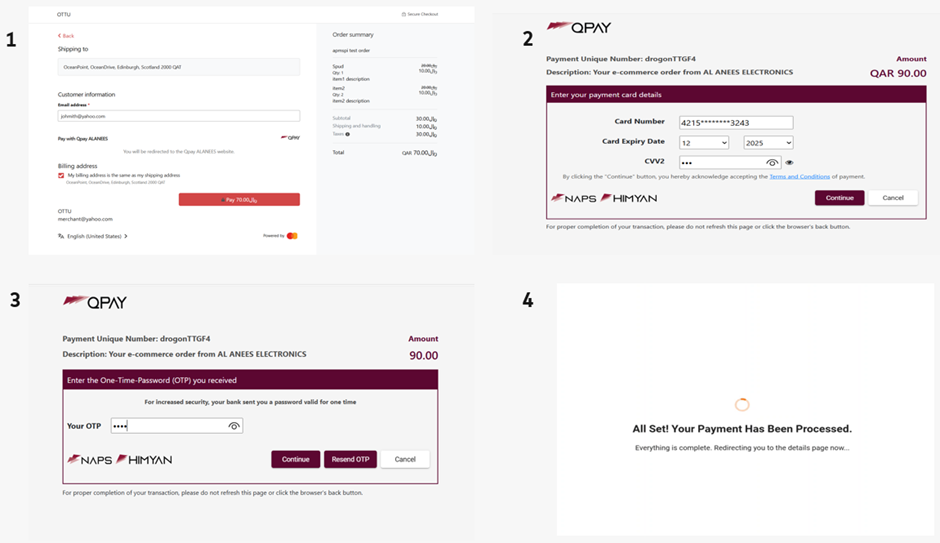
- Consumers:
- Select products and services.
- Complete the checkout process.
- Provide basic customer information such as first name, last name, email address, telephone number, and address details.
- Select QPAY as a payment option.
- The browser redirects consumers to the QPAY page.
- The consumer provides card details and authenticates the payment.
- The browser redirect the consumers to your page with the final payment status.
If the payment process is unsuccessful, then the consumers can try using another payment method.
QPAY Integration
QPAY through Direct Payment
- Direct Payment integration enables you to offer QPAY on your checkout page.
- QPAY is supported from the Direct API version 100 and later.
- Submit an Initiate Browser Payment request where
sourceOfFunds.browserPayment.type = QPAYandbrowserPayment.operation = PAY.
QPAY Transactions
| Transaction Details | Value |
|---|---|
| Payment type | Debit Switch Gateway |
| Supported countries | Qatar |
| Supported currencies | QAR |
| Supported operations | Purchase (PAY), PARTIAL REFUND, REFUND |
| Refund Validity | As per QPAY guidelines, Refunds cannot be issued after 90 days from the date of purchase. |
| Chargeback | Not applicable |
Specific parameter fields
In addition to the standard fields that are required in a browser payment request, provide the following parameter fields in the Initiate Browser Payment request for QPAY.
| Parameters Name | Mandatory or Optional | Description |
|---|---|---|
|
Mandatory | Specifies that amount, currency, notification url, source of funds, and operation are required. |
Initiate QPAY payment request
{
  "apiOperation": "INITIATE_BROWSER_PAYMENT",
  "billing": {
    "address": {
      "city": "Edinburgh",
      "company": "MPGS",
      "country": "QAT",
      "stateProvince": "Scotland",
      "street": "OceanPoint",
      "street2": "OceanDrive",
      "postcodeZip": "2000"
    }
  },
  "shipping": {
    "address": {
      "city": "Edinburgh",
      "company": "MPGS",
      "country": "QAT",
      "stateProvince": "Scotland",
      "street": "OceanPoint",
      "street2": "OceanDrive",
      "postcodeZip": "2000"
    }
  },
  "browserPayment": {
    "operation": "PAY",
    "returnUrl": "{{remotehost}}/api/documentation/integrationGuidelines/index.html"
  },
  "customer": {
    "account": {
      "id": "customerAccount"
    },
    "dateOfBirth": "xxxx-xx-xx",
    "email": "xxxx@mxxxx.com",
    "firstName": "Ganxxxh",
    "lastName": "Surxxxxxhi",
    "mobilePhone": "07xxxxxx5",
    "nationalId": "nationalId1",
    "phone": "98xxxxx98"
  },
  "order": {
    "reference": "TEST-SUCCEED",
    "amount": "90.00",
    "currency": "QAR",
    "itemAmount": "90.00",
    "item": [
      {
        "detail": {
          "unitTaxRate": "0"
        },
        "name": "Spud",
        "quantity": "1",
        "unitPrice": "45",
        "unitTaxAmount": "0.02",
        "unitDiscountAmount": "0.03",
        "description": "item1 description",
        "sku": "item1"
      },
      {
        "detail": {
          "unitTaxRate": "0"
        },
        "name": "item2",
        "quantity": "1",
        "unitPrice": "45",
        "unitTaxAmount": "0.02",
        "unitDiscountAmount": "0.03",
        "description": "item2 description",
        "sku": "item2"
      }
    ],
    "shippingAndHandlingAmount": "0.02",
    "taxAmount": "0.04",
    "description": "apmspi test order",
    "notificationUrl": "https://pki.qa05.gateway.mastercard.com/callbackInterface/apmspinotification"
  },
  "sourceOfFunds": {
    "browserPayment": {
      "type": "QPAY"
    },
    "type": "BROWSER_PAYMENT"
  }
}
Initiate QPAY payment response
{
  "apiOperation": "INITIATE_BROWSER_PAYMENT",
  "billing": {
    "address": {
      "city": "Edinburgh",
      "company": "MPGS",
      "country": "QAT",
      "stateProvince": "Scotland",
      "street": "OceanPoint",
      "street2": "OceanDrive",
      "postcodeZip": "2000"
    }
  },
  "shipping": {
    "address": {
      "city": "Edinburgh",
      "company": "MPGS",
      "country": "QAT",
      "stateProvince": "Scotland",
      "street": "OceanPoint",
      "street2": "OceanDrive",
      "postcodeZip": "2000"
    }
  },
  "browserPayment": {
    "operation": "PAY",
    "returnUrl": "https://qa05.gateway.mastercard.com/api/documentation/integrationGuidelines/index.html"
  },
  "customer": {
    "account": {
      "id": "customerAccount"
    },
    "dateOfBirth": "1999-12-31",
    "email": "gxxxx@mxxxx.com",
    "firstName": "Gaxxxxh",
    "lastName": "Suxxxxhi",
    "mobilePhone": "077xxxx55",
    "nationalId": "nationalId1",
    "phone": "98****8"
  },
  "order": {
    "reference": "TEST-SUCCEED",
    "amount": "90.00",
    "currency": "QAR",
    "itemAmount": "90.00",
    "item": [
      {
        "detail": {
          "unitTaxRate": "0"
        },
        "name": "Spud",
        "quantity": "1",
        "unitPrice": "45",
        "unitTaxAmount": "0.02",
        "unitDiscountAmount": "0.03",
        "description": "item1 description",
        "sku": "item1"
      },
      {
        "detail": {
          "unitTaxRate": "0"
        },
        "name": "item2",
        "quantity": "1",
        "unitPrice": "45",
        "unitTaxAmount": "0.02",
        "unitDiscountAmount": "0.03",
        "description": "item2 description",
        "sku": "item2"
      }
    ],
    "shippingAndHandlingAmount": "0.02",
    "taxAmount": "0.04",
    "description": "apmspi test order",
    "notificationUrl": "https://pki.qa05.gateway.mastercard.com/callbackInterface/apmspinotification"
  },
  "sourceOfFunds": {
    "browserPayment": {
      "type": "QPAY"
    },
    "type": "BROWSER_PAYMENT"
  }
}
Interpretation of the Transaction result
This table shows the transaction response codes for the possible scenarios that you may encounter after initiating the QPAY payments.
| Initiate browser payment response | Result | What this means |
|---|---|---|
response.gatewayCode=SUBMITTED |
SUCCESS |
Redirect the payer using the URL provided in the response. |
| Retrieve transaction or Retrieve order response | Result | What this means |
|---|---|---|
response.gatewayCode = APPROVED |
SUCCESS |
The payment is successful. |
response.gatewayCode = PENDING |
PENDING |
The Mastercard Gateway is waiting for a notification from the acquirer about the payment result. Try RETRIEVE_TRANSACTION again later or listen for notifications from the Mastercard Gateway. |
response.gatewayCode = CANCELLED |
FAILURE |
The payer cancelled the interaction for this payment. |
response.gatewayCode = DECLINED or ACQUIRER_SYSTEM_ERROR |
FAILURE |
The payment was declined. Offer the payer to try another payment method. If the response is ACQUIRER_SYSTEM_ERROR, contact the acquirer for the reason or try RETRIEVE_TRANSACTION again. |
response.gatewayCode = TIMED_OUT |
FAILURE |
Treat this as a declined payment. The Mastercard Gateway ensures the transaction is not successful or will revert it. |
QPAY through Hosted Checkout
Hosted Checkout integration allows you to collect payment details from your payer through an interaction that the gateway hosts and displays. From the API version 100 and later, QPAY is automatically available as a payment method once ANZ Worldline Payment Solutions enables and configures you for this payment method. For more information, see Browser Payments through Hosted Checkout integration.
Webhook notifications
If you have subscribed to ANZ eGate payment gateway webhook notifications, you will receive additional notifications on the paymentStatus.